How to Unblur a Picture (and When You Can't)
Out of focus, camera shake or motion blur: how to tell which blur you have, fix a blurry picture with AI or by hand, and what no tool can bring back.

A blurry photo usually isn't lost. Whether you can unblur it depends on what kind of blur it is and how much detail the camera still caught. This guide shows you how to tell, how to fix it, and when to stop trying.
We tested every method below on real photos that came out blurry: a phone shot that missed focus, cats that moved, a dim restaurant portrait and a 1950s print of someone turning their head. You'll see what worked and what didn't.
First, figure out which blur you have
Zoom in on the part that matters (usually a face or the main subject) and look at the edges.
- Out of focus. Everything looks soft and evenly smeared, like looking through frosted glass. Edges are fuzzy in every direction. This happens when the camera focused on the background, or you were too close.
- Camera shake. Edges are doubled or streaked in one direction, and the whole photo is affected the same way. Common in low light, when the shutter stays open longer.
- Motion blur. Only the thing that moved is streaked (a hand, a pet, a car) while the background is sharp.
- Low resolution. The photo is simply small or heavily compressed. It looks blocky or soft when you enlarge it. That's a sharpening and upscaling job, covered in how to make a picture clearer.
Out-of-focus and shake blur are the easiest to fix. Strong motion blur is the hardest.
How to unblur a picture with AI
AI unblurring doesn't reverse the blur like an undo button. The model has learned what sharp hair, skin, fur and text look like, and it predicts the sharp version of your photo. That works remarkably well when the blur is moderate.
- Open Unblur Image and upload the photo (JPG, PNG or WebP). No account is needed for the Standard version.
- Pick a version. Standard handles everyday phone shots up to 2 megapixels. Pro works on the full photo, up to 6 megapixels, which matters if you want to print or crop.
- Wait for the result, usually under a minute, then drag the slider to compare it with the original before you download.
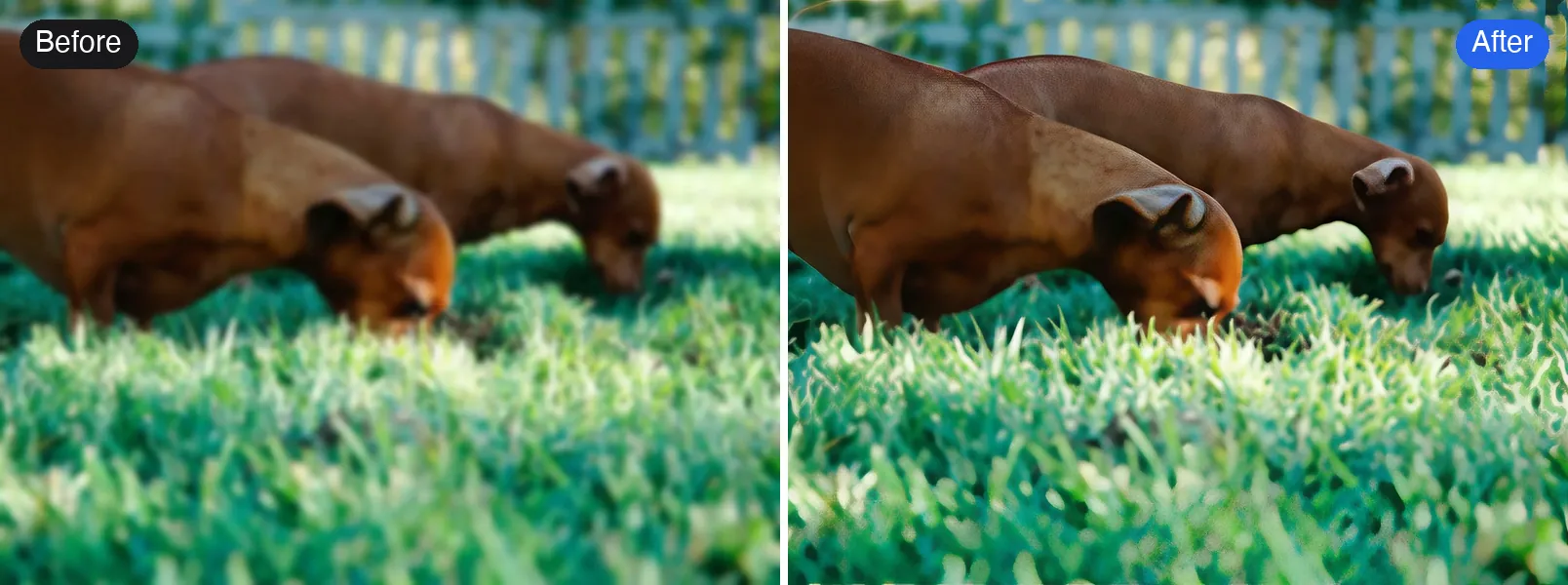
In our tests, missed focus improved the most: the frog's skin texture, a cat's whiskers and a woman's face in a dim restaurant all came back clearly. Motion blur got noticeably better too, but at that level the model partly redraws the face, so always compare before you keep it.
How to fix a blurry picture by hand
If you'd rather do it yourself, every major editor has a deblur or sharpen tool. They work for slight blur and give you full control.
Photoshop
- Duplicate the layer so you can compare.
- For camera shake, try Filter > Sharpen > Shake Reduction. Photoshop estimates the shake direction for you.
- For soft focus, use Filter > Sharpen > Smart Sharpen, set Remove to Lens Blur, and start with Amount around 100% and Radius 1 to 2 px.
- Zoom to 100% and check edges for halos. If you see bright outlines, lower the amount.
Lightroom
- In the Detail panel, raise Sharpening to 50 to 80.
- Hold Alt (Option on Mac) while dragging Masking so only edges get sharpened, not smooth skin or sky.
GIMP (free)
- Use Filters > Enhance > Unsharp Mask.
- Start with Radius 2, Amount 0.8 and adjust while watching the preview.
Manual sharpening increases contrast along edges. It can make a slightly soft photo look crisp, but it can't invent detail that isn't there, so it won't rescue a photo that's badly out of focus.
What no tool can unblur
Be skeptical of any tool that promises to fix everything.
- Faces only a few pixels wide. There isn't enough information to recover a real face. AI will draw a plausible one, not the actual person.
- Text you can't read at all. The model may produce letters that look right but say something else. Never rely on unblurred text for documents, plates or numbers.
- Blurred on purpose. Faces or text blurred or pixelated for privacy can't be restored. Any "unblurred" version is a guess.
- Extreme motion. When a subject is a long streak, the original shape is gone.
How to avoid blurry photos next time
- Tap the subject on your phone screen before shooting so it focuses there.
- In low light, brace your elbows or lean on something, or use a timer.
- Turn on burst mode for moving subjects and keep the sharpest frame.
- Clean the lens. A fingerprint smudge looks exactly like soft focus.
Quick answers
Can I unblur a picture for free? Yes. The Standard version of Unblur Image runs on the free credits everyone gets each day, no sign-up needed.
Will it work on my phone? Yes. Open the page in your phone's browser and upload from your gallery. The photo is resized on your phone before it's sent.
Is unblurring the same as sharpening? Not quite. Sharpening is for photos that are a little soft or too small; unblurring is for photos where the camera moved or focused on the wrong thing. If you're not sure, try Sharpen Image for mild softness and Unblur for anything clearly smeared.
用你自己的照片试试
去除照片里的运动模糊和失焦模糊。