Remove Glare from Photo and Fix Glasses Reflections
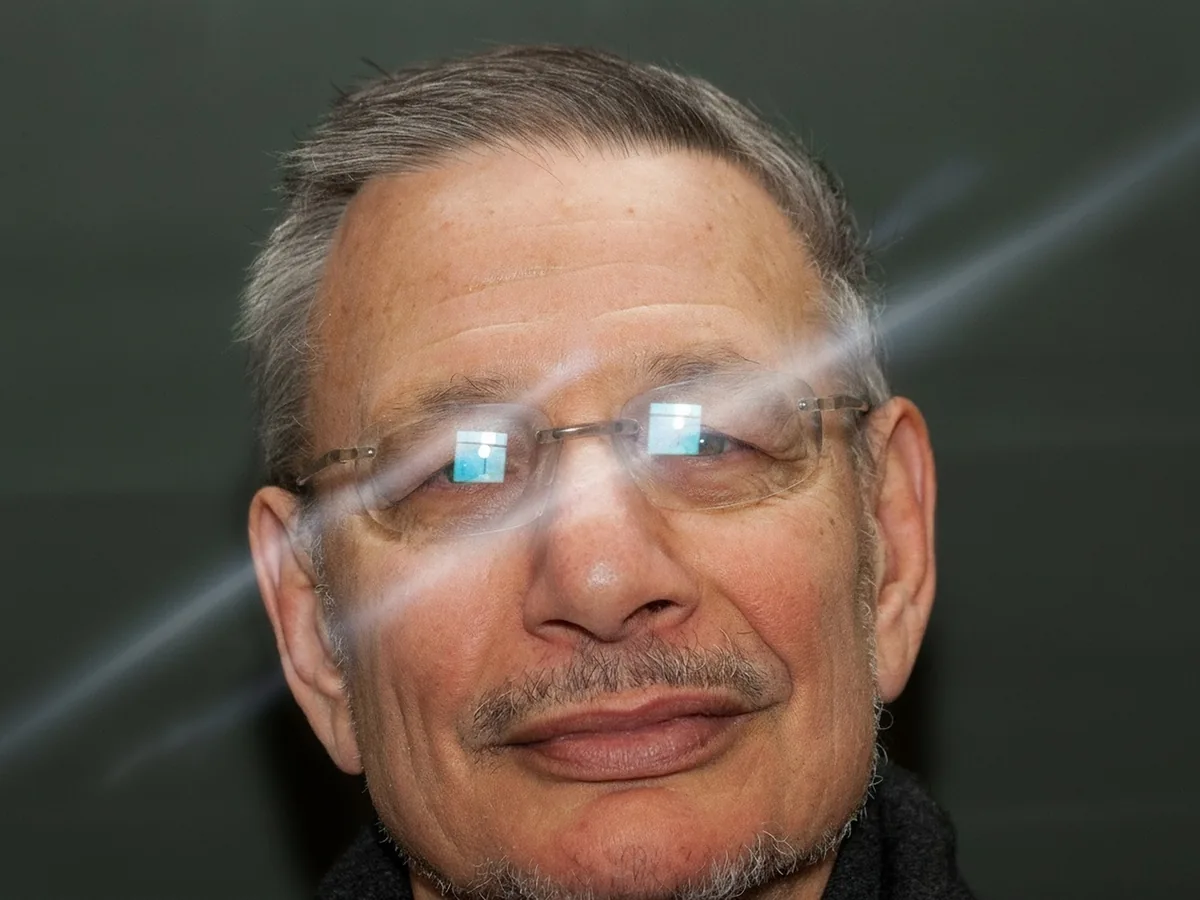
Glare on glasses, a reflection on the glass over a print, a flash hotspot or sun flare. Upload the photo and compare the result before you save anything.
No photo? Try one:
Upload Image
Drag and drop, or click to browse
Free daily credits
No sign-up
Private
Two versions of the glare remover
Both versions clear the same kinds of glare and leave faces alone. Pro returns a bigger file.
Standard for everyday photos
Removes the glare and gives the photo back at about 2.4 megapixels, plenty for sharing and screens. On the portrait above, the flash spot on her glasses is gone and her eyes, frames and earrings are unchanged. Covered by the daily free credits.
Pro for prints and close crops
The same glare removal at about 4.2 megapixels, so you can print the photo or crop in on a face. On the portrait above, the window reflections on both lenses are cleared and the rimless frames stay exactly where they were.
How to remove glare from a photo online
Three steps. A run usually takes under two minutes.
Upload the photo with glare
JPG, PNG or WebP up to 20 MB. A phone photo of a framed print or a screen works too.
Choose Standard or Pro
Standard for sharing and social posts. Pro if you want to print the photo or crop in.
Check the eyes, then download
Slide across the spot where the glare was, usually the eyes. Download only if you like what you see.
What glare removal can and can't do
We tried it on real photos with glare: two portraits with window glare on their glasses, a painting photographed behind museum glass, and a park shot straight into the sun.
Glare on glasses: the best case
Reflections on eyeglass lenses came off cleanly on both portraits, and the frames, eye color and expression stayed the same. Behind a solid white patch, the eyes are drawn by the AI: they look like the person, but check them with the slider.
Glass, flash and sun flare
The painting behind display glass came back without reflections and with its colors intact, which helps with framed prints and artwork you can't take out of the frame. Flash hotspots and sun flare streaks went too, with the sun itself kept. Spots the glare washed out can look a little darker afterwards.
What sits under the glare is a guess
The AI can't see through glare. Where it hides something completely, the result is filled in with what most likely belongs there, so check those spots with the slider. For ID photos or anything where details must be exact, retake the photo instead.
How to avoid glare without AI
Most glare can be stopped before you press the shutter. These tricks work with any camera or phone.
If you can retake the photo, that always gives the most faithful result. When you can't, or the glare covers a face, this tool does the retouching for you in a minute or two.
1
Change the angle
Glare is light bouncing straight back at the lens. Ask the person to tilt their glasses down slightly, or shoot a framed picture from a little to the side, and the reflection moves out of the shot.
2
Turn off the flash and move the light
Direct flash causes the worst hotspots. Use daylight from the side, or bounce a lamp off a wall or ceiling instead of pointing it at the subject.
3
Use a polarizing filter
A circular polarizer on a camera, or a clip-on one for a phone, cuts reflections from glass and water. Rotate it while watching the screen until the glare fades.
4
Paint it out in an editor
In Photoshop, the Remove Tool or Clone Stamp can rebuild a small hotspot from the pixels around it. Lightroom's Dehaze slider softens a light veil of glare. Large reflections over eyes take a skilled retoucher.
Remove glare from photo FAQ
Yes. Standard costs 8 credits and is covered by the free credits everyone gets each day, no account needed. Pro uses 16 purchased credits. Downloads have no watermark.
Yes, that's what it does. The model is told to keep the frames and lenses and remove only the reflections on them, so the person still wears the same glasses in the result.
Yes. If you photographed a print through a frame or under a lamp, run it here first, and black and white photos stay black and white. Then use Restore Old Photos to clear scratches and fading.
It reduces flash hotspots and shiny patches on foreheads and cheeks along with glare on glasses. Very strong white spots are filled in with natural skin, so compare with the slider before you share.
No, it works on photos only. For a video you can export a single frame as an image and fix that, but there's no way to fix a whole clip here.
Your photos are used only to create your result, never to train AI. Without an account they're deleted after 24 hours. Signed in, they're kept in History for 72 hours, or until you delete them if you turn on "Keep my tasks". Details are in our Privacy Policy.
More ways to fix your photos
Sharpen Image
Make a picture clearer when it is only slightly soft.
Unblur Image
Remove motion blur and out-of-focus blur from photos.
Restore Old Photos
Clear scratches, dust and fading on scanned prints.